


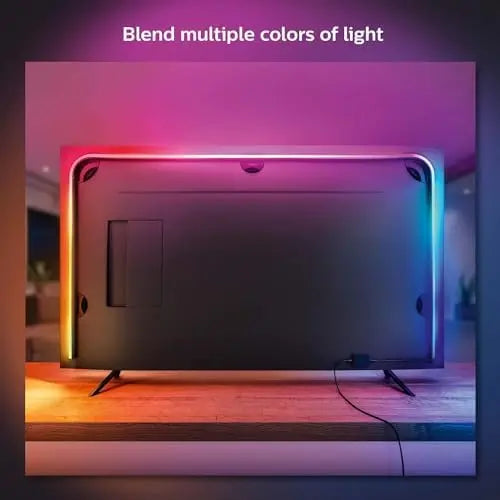

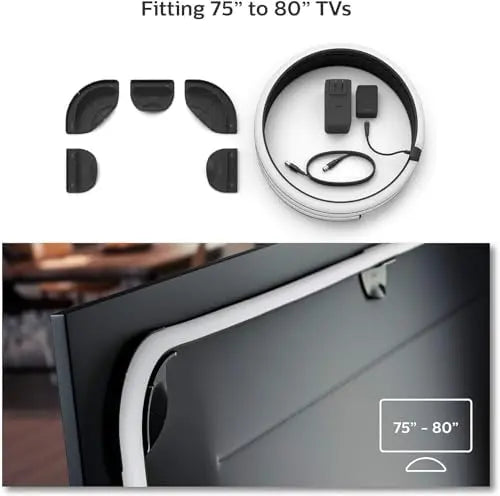
Philips Hue 75" Smart Light Strip - White and Color Ambiance LED Color-Changing TV Backlight - Sync with Television
Philips Hue 75" Smart Light Strip - White and Color Ambiance LED Color-Changing TV Backlight - Sync with Television
Philips Hue 75" Smart Light Strip - White and Color Ambiance LED Color-Changing TV Backlight - Sync with Television is selected for shoppers who want clear specifications, reliable product details and a simple buying experience from TechTreasuries. This smart light page is written to help you compare the model, understand the key features and choose confidently without digging through confusing marketplace text. It is especially relevant for searches such as Philips Hue Smart Light, Smart Light, Smart Lighting, gaming accessories, gaming gear.
Why this product stands out
- Adds practical lighting and ambience to your home or entertainment setup
- Smart, dimmable or sensor-based features are highlighted where listed
- Useful for bedrooms, living rooms, kitchens, hallways or outdoor areas depending on model
- Designed for shoppers comparing convenience, style and lighting control
Key details
- Availability: Ships from TechTreasuries
- Brand: Philips Hue
- Product type: Smart Light
Compatibility and use
- Check product options and device requirements before purchase
Before you buy
Please review the selected variant, storage, color, size, connection type and condition before checkout. For renewed or refurbished items, cosmetic condition and included accessories may vary by listing, so the condition is stated clearly where available.
Why buy from TechTreasuries?
TechTreasuries organizes products with clean titles, readable specifications and checkout-focused details so you can compare tech products faster and buy with confidence.
Pairs well with
In stock! Ships within 7 - 14 Business Days for Free Shipping & 3 - 5 business days with Express Shipping.
14 - Days Money Back guarantee
2-Year Warranty
Complimentary shipping & returns
Philips Hue 75" Smart Light Strip - White and Color Ambiance LED Color-Changing TV Backlight - Sync with Television
If you have any questions, you are always welcome to contact us. We'll get back to you as soon as possible, within 24 hours on weekdays.
-
Shipping Information
Use this text to answer questions in as much detail as possible for your customers.
-
Customer Support
Use this text to answer questions in as much detail as possible for your customers.
-
FAQ’s
Use this text to answer questions in as much detail as possible for your customers.
-
Contact Us
Use this text to answer questions in as much detail as possible for your customers.
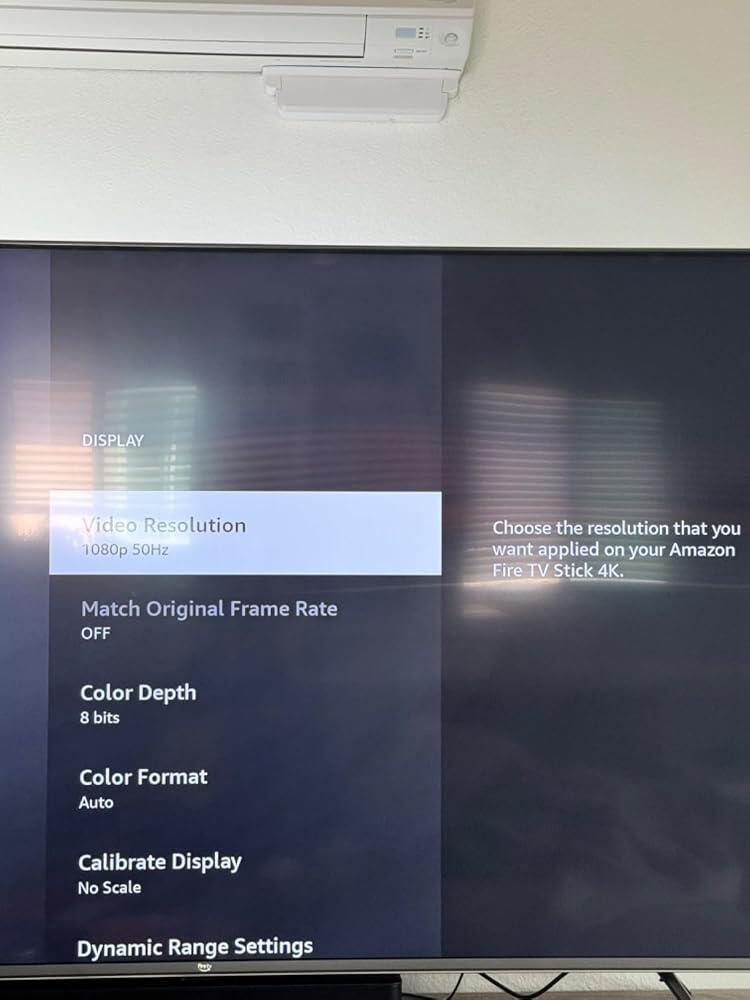
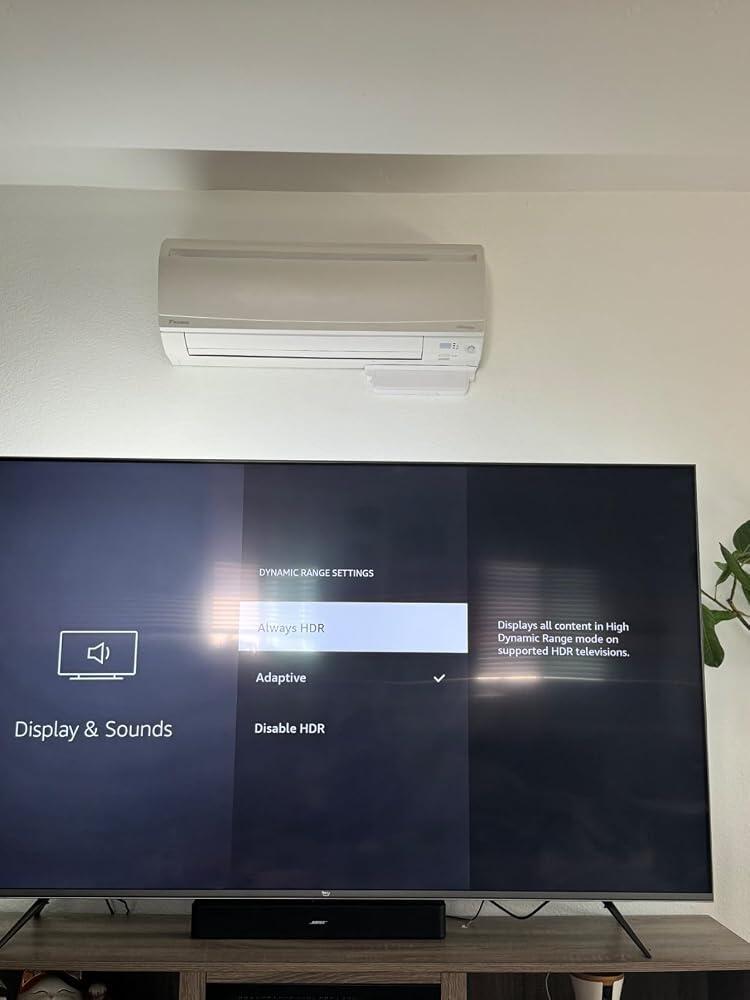
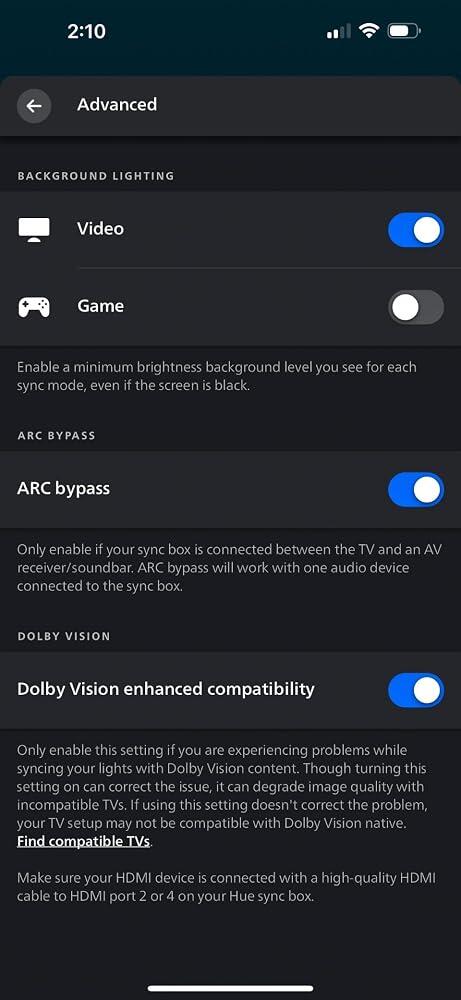
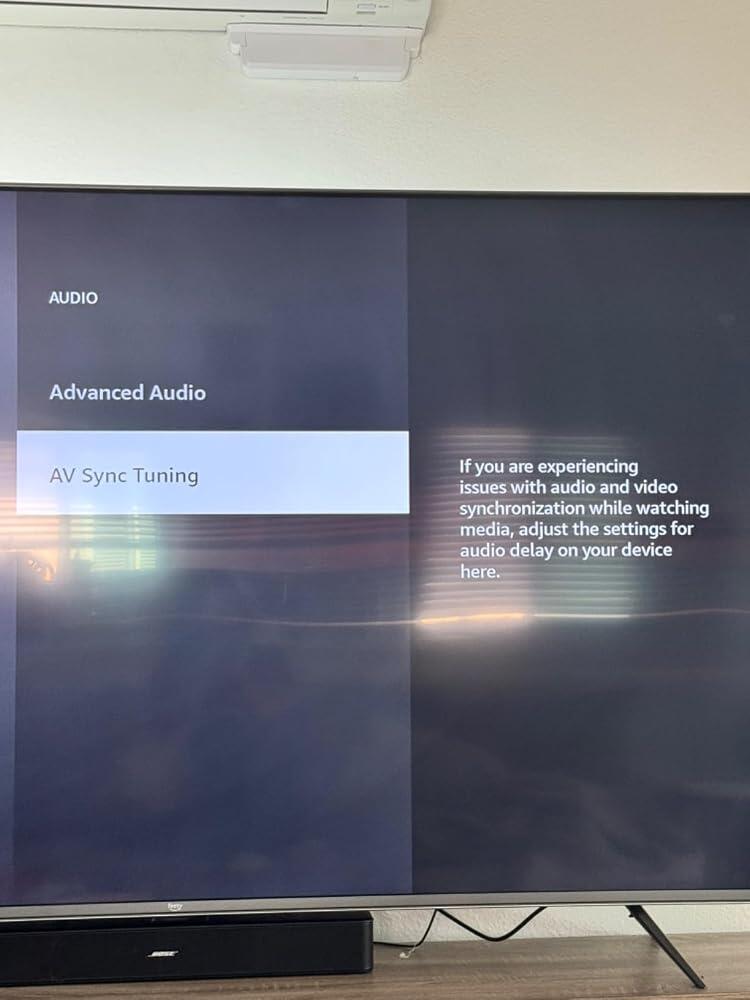
If you got this for the viral TV strip lights it DOES NOT WORK WITH SMART TV’s. You need an external streaming device. You need a Philips hue bridge, AND the sync box if you want it to sync with your audio or tv display.. and the price tags are hefty.It worked really well which is why it gets 5 stars but I didn’t think it would be this difficult to set up, also because it’s not compatible with smart tv’s. There weren’t even any informational videos out there for this or just online in general.. so I have photos attached if anyone has trouble with setting up for a fire smart tv. Only if you have a Samsung smart tv it’ll sync, not even the hue essentials app will work correctly. You need to get a fire stick or any external streaming device, plug it into the sync box, change the audio to AV Sync tuning, resolution to 1080, (I think the fire stick starts over 2000 and it didn’t work), display range to adaptive, then go into the hue app on your phone and update the advanced settings to Dolby digital vision enhanced compatibility but I’m not sure if this just for the fire stick since it uses Dolby digital image. Also make sure your fire stick is in the second or fourth HMDI outlet on the sync box. SUPER SPECIFIC and confusing but I was so happy when I got it down. Good luck and I hope I was able to help some people out there!
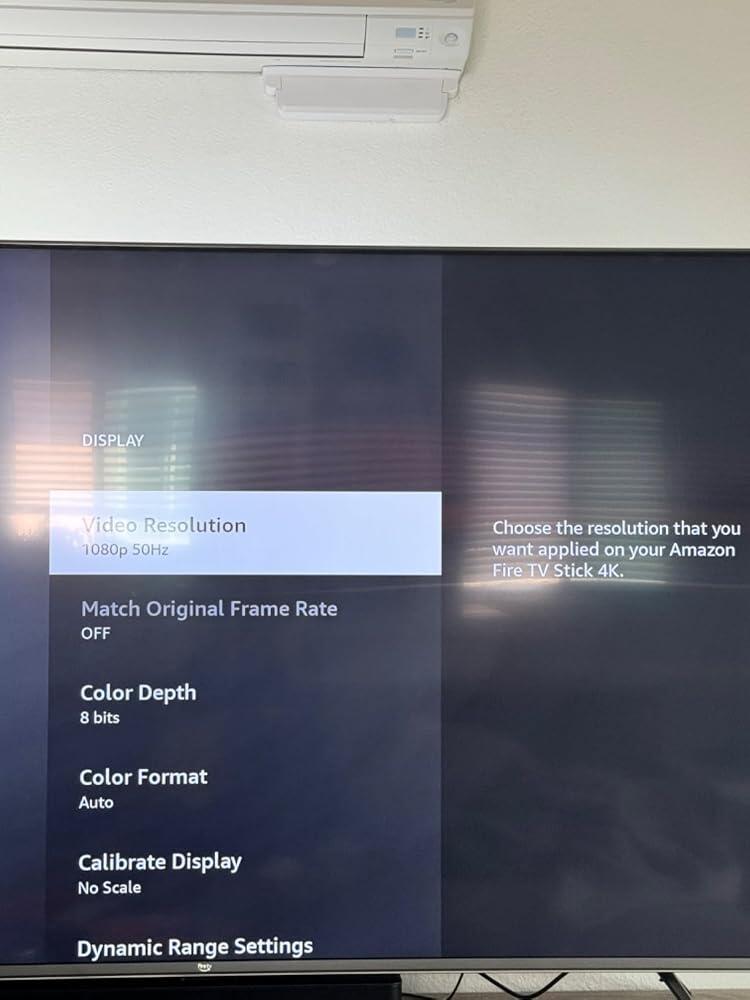
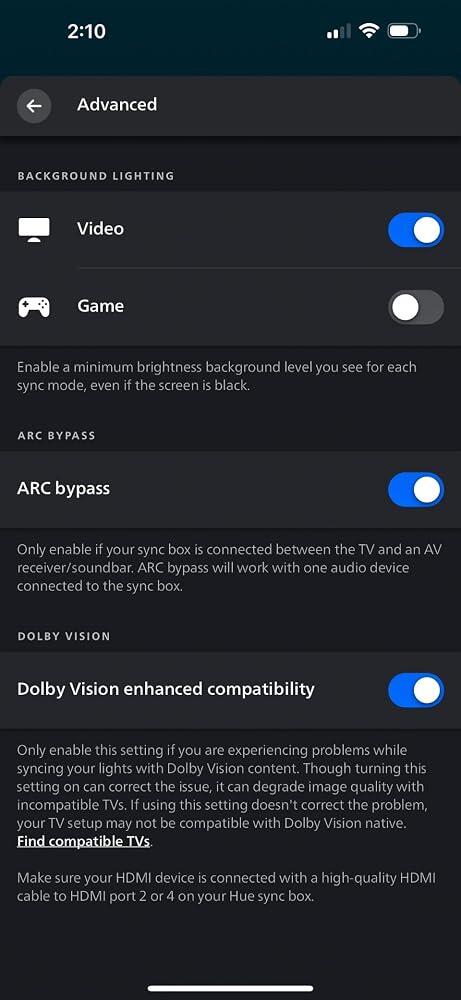
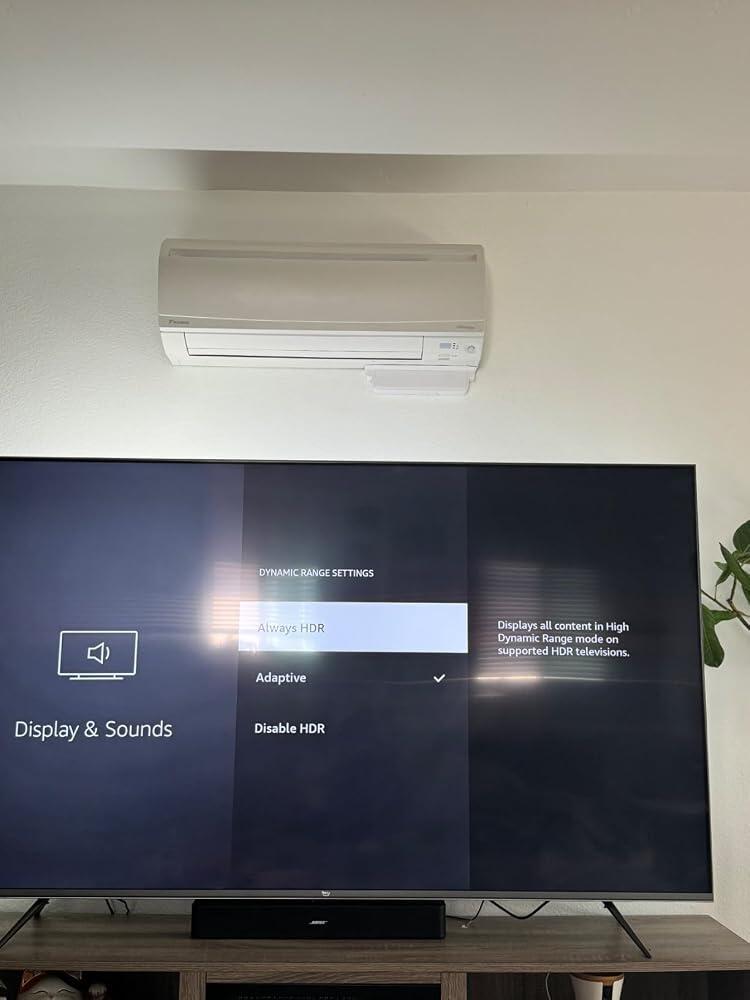
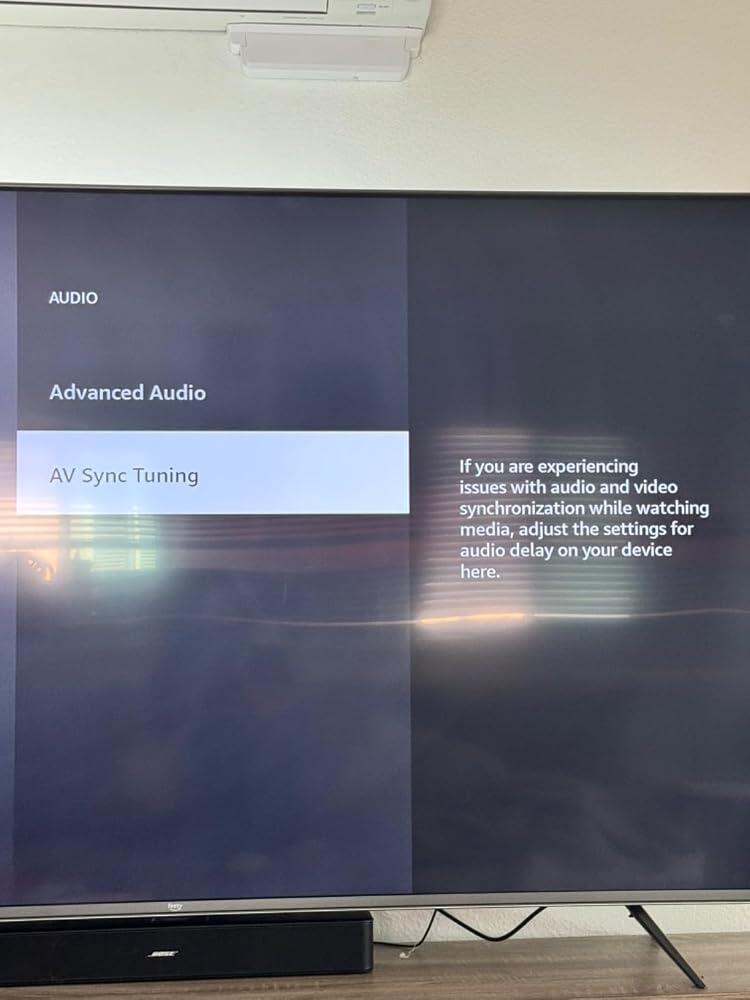
If you got this for the viral TV strip lights it DOES NOT WORK WITH SMART TV’s. You need an external streaming device. You need a Philips hue bridge, AND the sync box if you want it to sync with your audio or tv display.. and the price tags are hefty.It worked really well which is why it gets 5 stars but I didn’t think it would be this difficult to set up, also because it’s not compatible with smart tv’s. There weren’t even any informational videos out there for this or just online in general.. so I have photos attached if anyone has trouble with setting up for a fire smart tv. Only if you have a Samsung smart tv it’ll sync, not even the hue essentials app will work correctly. You need to get a fire stick or any external streaming device, plug it into the sync box, change the audio to AV Sync tuning, resolution to 1080, (I think the fire stick starts over 2000 and it didn’t work), display range to adaptive, then go into the hue app on your phone and update the advanced settings to Dolby digital vision enhanced compatibility but I’m not sure if this just for the fire stick since it uses Dolby digital image. Also make sure your fire stick is in the second or fourth HMDI outlet on the sync box. SUPER SPECIFIC and confusing but I was so happy when I got it down. Good luck and I hope I was able to help some people out there!
The media could not be loaded.
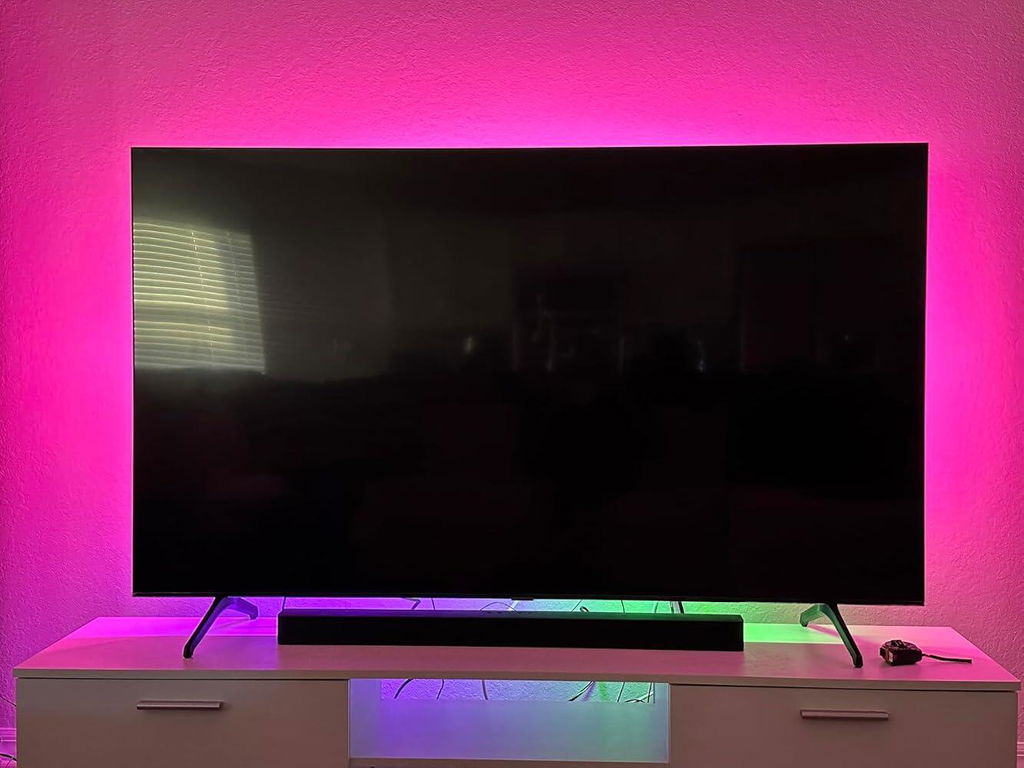
It does what you expect. On top of the Gradient Lightstrip for my TV, I also bought the play bars. You can isolate each light into individual colors. If you’re not new to the LED scene, then know you should be familiar with setting scenes with the app.When everything arrived, I immediately started setting up. The first problem I had was connecting the bridge to the internet. The first two lights came on but not the third. Without being connected to the internet, I can’t access the bridge with the app or move on with the rest of the installation. The solution to that, was that I plugged the network cable it came with from the bridge to the splitter I have. Come to find out, the bridge doesn’t work with splitters. Technically, the protocol doesn’t allow for it. You have to directly connect it to the router.I have a 70 inch Samsung Smart TV. I bought the 65” light strip. After setting up all the lights, the bridge, and the sync box, I was excited to play something colorful like Avatar or Spiderman(across the spiderverse). So, having smart tv and all I had to do was press the Netflix button on my remote and it brings me to the TV app(There’s a reason I say that) BUT, starting a movie, the lights just dimmed to the lowest white light and they were not synced to what was being shown on screen. The app kept showing me that nothing was connected to the sync box. I of course didn’t understand if I connect my tv to the box. After hours of research, I’ve done everything I could from getting different HDMI cables, to switching ends, to factory resetting the sync box, to seeing if my tv needed to be updated. I was afraid I bought a defective sync box. My last last thing to try was to call customer support. Surprisingly, after dialing the number, less than 5 minutes, I was on the phone with someone, which is impressive.Come to find out… to have lights sync, you can’t use it with TV Applications. You have to have a second source such as a PlayStation, Xbox, Firestick and so on. After learning that, I connected my PlayStation to the sync box, went to a YouTube video and it worked.So if you’re having this same issue, hopefully I was able to help someone out. Looking it up, I wasn’t the only one stumped with this same problem.All in all, after I got it to work, it’s amazing! The lights on top of a surround sound system, you don’t have to go to the movies anymore. You have an enhanced theater right in front of you. If you’re not watching TV, you can still work the lights with the app and either set a scene or choose whatever color(s) you prefer.It’s expensive for no reason. But you get what you pay for and that’s quality. You won’t be disappointed.P.S. The Bridge, Sync Box, and the Lights all use a big box plug. The blocky ones. So I had to utilize another power strip to get everything plugged in and working on top of everything I already had plugged.
The media could not be loaded.
It does what you expect. On top of the Gradient Lightstrip for my TV, I also bought the play bars. You can isolate each light into individual colors. If you’re not new to the LED scene, then know you should be familiar with setting scenes with the app.When everything arrived, I immediately started setting up. The first problem I had was connecting the bridge to the internet. The first two lights came on but not the third. Without being connected to the internet, I can’t access the bridge with the app or move on with the rest of the installation. The solution to that, was that I plugged the network cable it came with from the bridge to the splitter I have. Come to find out, the bridge doesn’t work with splitters. Technically, the protocol doesn’t allow for it. You have to directly connect it to the router.I have a 70 inch Samsung Smart TV. I bought the 65” light strip. After setting up all the lights, the bridge, and the sync box, I was excited to play something colorful like Avatar or Spiderman(across the spiderverse). So, having smart tv and all I had to do was press the Netflix button on my remote and it brings me to the TV app(There’s a reason I say that) BUT, starting a movie, the lights just dimmed to the lowest white light and they were not synced to what was being shown on screen. The app kept showing me that nothing was connected to the sync box. I of course didn’t understand if I connect my tv to the box. After hours of research, I’ve done everything I could from getting different HDMI cables, to switching ends, to factory resetting the sync box, to seeing if my tv needed to be updated. I was afraid I bought a defective sync box. My last last thing to try was to call customer support. Surprisingly, after dialing the number, less than 5 minutes, I was on the phone with someone, which is impressive.Come to find out… to have lights sync, you can’t use it with TV Applications. You have to have a second source such as a PlayStation, Xbox, Firestick and so on. After learning that, I connected my PlayStation to the sync box, went to a YouTube video and it worked.So if you’re having this same issue, hopefully I was able to help someone out. Looking it up, I wasn’t the only one stumped with this same problem.All in all, after I got it to work, it’s amazing! The lights on top of a surround sound system, you don’t have to go to the movies anymore. You have an enhanced theater right in front of you. If you’re not watching TV, you can still work the lights with the app and either set a scene or choose whatever color(s) you prefer.It’s expensive for no reason. But you get what you pay for and that’s quality. You won’t be disappointed.P.S. The Bridge, Sync Box, and the Lights all use a big box plug. The blocky ones. So I had to utilize another power strip to get everything plugged in and working on top of everything I already had plugged.
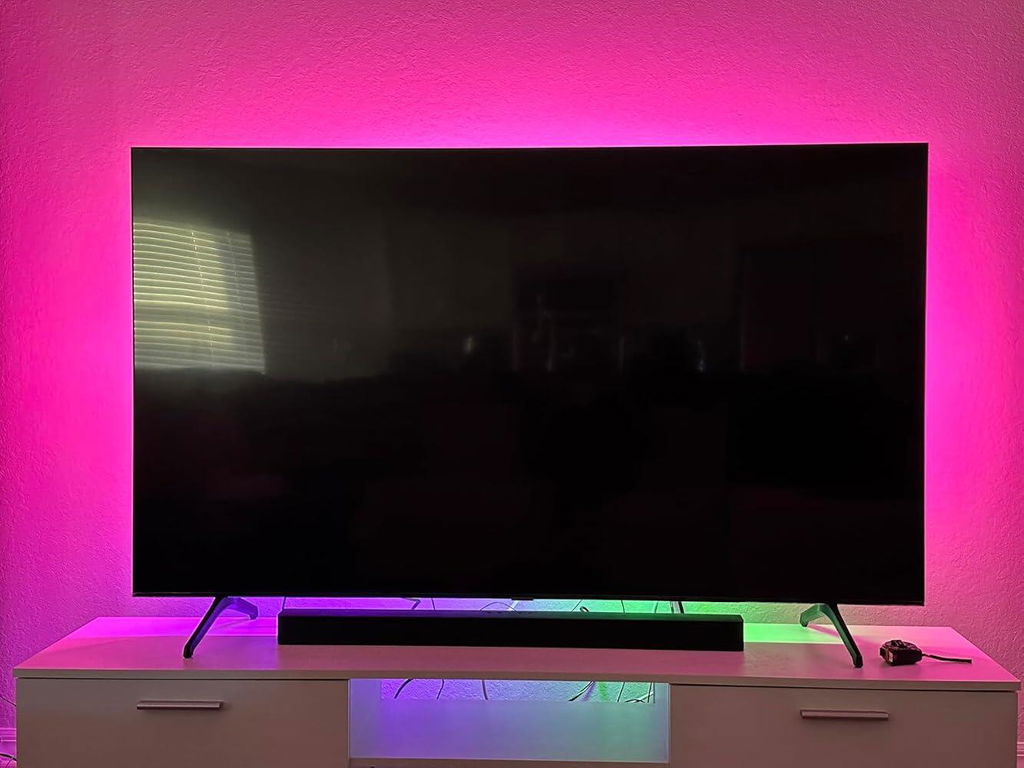
This adds a cool extra aesthetic to our home entertainment center. It is durable and very easy to install. Also it is easy to use in the HUE app. As a side note, when used with certain TV's to get the more interactive features of the light, there is an app that is required on the TV itself and that requires a subscription or purchase (depending on how you choose to proceed).
This adds a cool extra aesthetic to our home entertainment center. It is durable and very easy to install. Also it is easy to use in the HUE app. As a side note, when used with certain TV's to get the more interactive features of the light, there is an app that is required on the TV itself and that requires a subscription or purchase (depending on how you choose to proceed).
Great lights. Makes movies and anything you’re watching better. Try watching The Force Awakens when Kylo Ren is fighting Rey and they’re dueling it out with light sabers. Or, if you’re a raver like me, open up YouTube and search for a DJ set and watch the lights go crazy (in an awesome way).Lights are insanely easy to install. Find the center at the top of your TV, take the center black clip and peel back the adhesive and attach it to the top center at the border of the tv. Then just stick on the remaining clips.I also bought the hue light bulbs and I can now have a full-on dance party.Tis all 🤷🏻♂️
Great lights. Makes movies and anything you’re watching better. Try watching The Force Awakens when Kylo Ren is fighting Rey and they’re dueling it out with light sabers. Or, if you’re a raver like me, open up YouTube and search for a DJ set and watch the lights go crazy (in an awesome way).Lights are insanely easy to install. Find the center at the top of your TV, take the center black clip and peel back the adhesive and attach it to the top center at the border of the tv. Then just stick on the remaining clips.I also bought the hue light bulbs and I can now have a full-on dance party.Tis all 🤷🏻♂️
This light strip is quite beautiful, capable of many colors and is easy to mount/fits and stays secure to the back of your TV. You may want to google the best way to mount this. One pointer I've found is for the best lighting effect, you'll want your TV 2-4" from the wall.The Hue sync app (can be downloaded on newer Samsung and LG TVs) will allow you to sync without buying the expensive Hue HDMI Sync box. The app also has the benefit of allowing all your onboard TV streaming apps (Netflix, Disney +, any app already installed on your TV) to sync, while the Hue HDMI sync box requires an external streamer box to sync with streaming apps. This is a huge bonus, it'll save you money.However I have noticed the Hue sync app does have a slight (but noticeable) delay in light synicing; that is, when a scene changes on the program you're watching, the lighting effect takes a fraction of a second to update, making for a very slight delay in syncing. It's not a huge deal and most people will probably not even notice it after a bit, but it is something to take note of. Google this for more information.This purchase was worth it and I will be keeping it. Try to catch it on a sale if you can!
This light strip is quite beautiful, capable of many colors and is easy to mount/fits and stays secure to the back of your TV. You may want to google the best way to mount this. One pointer I've found is for the best lighting effect, you'll want your TV 2-4" from the wall.The Hue sync app (can be downloaded on newer Samsung and LG TVs) will allow you to sync without buying the expensive Hue HDMI Sync box. The app also has the benefit of allowing all your onboard TV streaming apps (Netflix, Disney +, any app already installed on your TV) to sync, while the Hue HDMI sync box requires an external streamer box to sync with streaming apps. This is a huge bonus, it'll save you money.However I have noticed the Hue sync app does have a slight (but noticeable) delay in light synicing; that is, when a scene changes on the program you're watching, the lighting effect takes a fraction of a second to update, making for a very slight delay in syncing. It's not a huge deal and most people will probably not even notice it after a bit, but it is something to take note of. Google this for more information.This purchase was worth it and I will be keeping it. Try to catch it on a sale if you can!
Really easy to install - love that they give you the plastic guides to install on the TV and then you just snap in the lights (versus other lights I've purchased, where you have to use adhesive on the light strip itself to stick them on - this works much better, allows you to install more confidently and line everything up so that it's even on both sides).I do wish they had a way to get lights across the bottom of my TV, though. These just go across the top and about 80% of the way down the left and right back side. If you have your TV on a stand, this is fine. But my 65% TV is mounted, with nothing below, so you don't get any lights shining down on the big open wall or floor. Having said that, it'd be hard to install across the bottom, as that's where my TV mount attaches. I ended up buying some floor hue lights, and have them shining up at the TV.Overall, these are great! I've had many cheap $30-50 light strips on the back of TVs over the years, and these feel high quality, worthy of their high price, and - with the hue play and iphone app - super easy to install and use. Even my wife was impressed when I played a Marvel movie. It's like surround sound, but for light.note: I tried putting extra hue lights behind the couch, next to my sonos surround sounds, and realized your eyes don't really see anything to the side (and obviously you don't see things behind you)....your focus is 100% ahead of you (about 145 degrees, not 180+). So this strip plus a few of the bars on the floor work great.
Really easy to install - love that they give you the plastic guides to install on the TV and then you just snap in the lights (versus other lights I've purchased, where you have to use adhesive on the light strip itself to stick them on - this works much better, allows you to install more confidently and line everything up so that it's even on both sides).I do wish they had a way to get lights across the bottom of my TV, though. These just go across the top and about 80% of the way down the left and right back side. If you have your TV on a stand, this is fine. But my 65% TV is mounted, with nothing below, so you don't get any lights shining down on the big open wall or floor. Having said that, it'd be hard to install across the bottom, as that's where my TV mount attaches. I ended up buying some floor hue lights, and have them shining up at the TV.Overall, these are great! I've had many cheap $30-50 light strips on the back of TVs over the years, and these feel high quality, worthy of their high price, and - with the hue play and iphone app - super easy to install and use. Even my wife was impressed when I played a Marvel movie. It's like surround sound, but for light.note: I tried putting extra hue lights behind the couch, next to my sonos surround sounds, and realized your eyes don't really see anything to the side (and obviously you don't see things behind you)....your focus is 100% ahead of you (about 145 degrees, not 180+). So this strip plus a few of the bars on the floor work great.
The Hue Sync experience is truly fun. I can't speak to the HDMI box because I use a PC, but I have a 77 inch LG G1 and I was pleasantly surprised at how accurate the light representation is. I've ran a large number of light show programs to test where and when the colors change and it is pretty spot on accurately changing colors exactly as it does on screen in the exact same spot. I was worried because it only has 7 light zones (2 on each side and 3 on top) but I've almost never noticed it not changing perfectly in sync with what is displayed. The very few times it has been off have been with a grueling spinning color wheel test image or other purposefully demanding content. Even then it is only by a little and you have to be looking for it, in normal use you will never see it miss even when looking for it. My TV is wall mounted and I didn't even have to take it off the mount. My only issue is it doesn't cover the bottom of the screen and Philips doesn't offer any solutions to cover that area that are as competent as the strip. I even purchased the Gradient Ambient Light Strip thinking it would do the job since it is basically the exact same product only without a preinstalled diffuser, but that turned out to be the only disappointing Hue product I have purchased. The Gradient Ambient light strip just doesn't work well with sync at all. It has 3 zones and depending on how you have it set up (where it is located in your room) it can display the wrong side of the screen or even have one zone that doesn't even work at all (either just a white light or it's off). Considering that one strip cost me 200 dollars I was pretty miffed about this and their customer support is very lacking. After days of talking to customer support on Facebook of all the hated places (I can't call as they are closed when I am home and they literally don't have an email address) they finally got back to me with a simple "we are aware of the problem". The Hue Play Bars work surprisingly well but it can be a pain to place their location in the app to get them to display colors properly. But this review is about the Gradient Lightstrip not the company, and that as a stand alone product works very, very well. So if you can live with no lights on the bottom, fighting to get a workaround solution you can live with considering it will never be as good as the rest of the screen, or it isn't an issue for you at all it is a must buy. As far as brightness goes it is plenty bright in my opinion, usable even in daylight as long as you close the blinds (I have normal wooden slat blinds not blackout blinds by any means) and the light shines across my entire wall and up into the ceiling or to the side and off the side wall. In fact yow will probably want to turn it down quite a bit as the light can be so bright it's distracting from the actual content. The music sync feature needs work though. It could benefit from some options as it seems pretty random what part of the music it reacts to, and with multiple lights it's hard to tell what part of the music any given light is reacting to.
The Hue Sync experience is truly fun. I can't speak to the HDMI box because I use a PC, but I have a 77 inch LG G1 and I was pleasantly surprised at how accurate the light representation is. I've ran a large number of light show programs to test where and when the colors change and it is pretty spot on accurately changing colors exactly as it does on screen in the exact same spot. I was worried because it only has 7 light zones (2 on each side and 3 on top) but I've almost never noticed it not changing perfectly in sync with what is displayed. The very few times it has been off have been with a grueling spinning color wheel test image or other purposefully demanding content. Even then it is only by a little and you have to be looking for it, in normal use you will never see it miss even when looking for it. My TV is wall mounted and I didn't even have to take it off the mount. My only issue is it doesn't cover the bottom of the screen and Philips doesn't offer any solutions to cover that area that are as competent as the strip. I even purchased the Gradient Ambient Light Strip thinking it would do the job since it is basically the exact same product only without a preinstalled diffuser, but that turned out to be the only disappointing Hue product I have purchased. The Gradient Ambient light strip just doesn't work well with sync at all. It has 3 zones and depending on how you have it set up (where it is located in your room) it can display the wrong side of the screen or even have one zone that doesn't even work at all (either just a white light or it's off). Considering that one strip cost me 200 dollars I was pretty miffed about this and their customer support is very lacking. After days of talking to customer support on Facebook of all the hated places (I can't call as they are closed when I am home and they literally don't have an email address) they finally got back to me with a simple "we are aware of the problem". The Hue Play Bars work surprisingly well but it can be a pain to place their location in the app to get them to display colors properly. But this review is about the Gradient Lightstrip not the company, and that as a stand alone product works very, very well. So if you can live with no lights on the bottom, fighting to get a workaround solution you can live with considering it will never be as good as the rest of the screen, or it isn't an issue for you at all it is a must buy. As far as brightness goes it is plenty bright in my opinion, usable even in daylight as long as you close the blinds (I have normal wooden slat blinds not blackout blinds by any means) and the light shines across my entire wall and up into the ceiling or to the side and off the side wall. In fact yow will probably want to turn it down quite a bit as the light can be so bright it's distracting from the actual content. The music sync feature needs work though. It could benefit from some options as it seems pretty random what part of the music it reacts to, and with multiple lights it's hard to tell what part of the music any given light is reacting to.

At Tech Treasuries, we make it easier for you to discover technology that fits your everyday needs.
We provide clear product information so you can compare your options and shop with confidence.
From gaming and entertainment to work and connected living, our collection is built around the way you use technology.
Whenever you need guidance, our team is here to help you make a more informed choice.
What people
are saying
Daniel CarterPurchased: iPhone 17 Pro MaxThe product information made it easy to compare the available models and choose the right storage option. The device matched the specifications shown on the listing.
Sophia BennettPurchased: Samsung 58-Inch 4K Smart TVI had a compatibility question before ordering and received a clear, practical response. The communication made the buying process feel much more straightforward.
Ethan WalkerPurchased: Xbox Series X Gaming SetupThe console, controller and headset were clearly listed with their individual specifications. It was easy to review the complete setup before adding everything to my cart.
Olivia MartinPurchased: Lenovo V15 LaptopThe laptop comparison guide helped me understand which features mattered for study and everyday work. It saved me from choosing a model that was more powerful than I actually needed.
Noah ThompsonPurchased: Samsung Galaxy S23 Ultra RenewedThe renewed-condition information was clearly explained, including the model, storage and color. I appreciated being able to review those details before placing the order.
Free shipping and returns
Authenticity Guarantee
Secure Checkout
Tracked Delivery
Dedicated Customer Support

TECHNOLOGY, CHOSEN WITH PURPOSE
From work and study to gaming, entertainment and staying connected, Tech Treasuries brings together practical technology for the way you live. Explore clear product details, compare your options and choose a device that genuinely suits your needs.
Customer Queries
Product Information
Every listing includes the available model, specifications, condition, colour, storage or size options where applicable. Please review the selected variant carefully before adding the product to your cart.
Shipping & Delivery
Orders are normally processed within 5-7 business days. Once your order has been dispatched, tracking information will be sent to the email address provided at checkout. Delivery times may vary depending on the destination and shipping service.
Product Condition
The condition of each product is clearly stated on its listing. Products described as new, renewed, refurbished or pre-owned may have different packaging, accessories and cosmetic characteristics, so please review the description before ordering.
Compatibility & Returns
Compatibility can vary by model, generation, region, operating system and accessories. Please check the listed specifications and confirm that the product is suitable for your existing devices before purchasing. You may request a return within 14 days of delivery, subject to our return eligibility requirements. Products should be returned in the required condition with the original accessories and packaging where applicable.
FAQs
Please read our FAQs page to find out more.
How do I know which product variant I am ordering?
The selected model, color, size, storage capacity or other available option will appear on the product page and in your cart. Please check these details before completing checkout.
Will I receive tracking information?
Yes. When tracking is available, it will be emailed to you after your order has been dispatched. You can also use the Track Order page to follow the delivery.
Can I return a product if I change my mind?
Eligible products may be returned when a request is submitted within 14 days of delivery. Return conditions and exclusions apply, so please review the Returns Policy before sending anything back.
How can I contact Tech Treasuries?
For general enquiries, email info@techtreasuries.com. For an existing order, contact orders@techtreasuries.com and include your order number.
Are accessories included?
Included accessories vary between products and conditions. Please refer to the product description to see exactly what is supplied with the item.