


Subscribe to our emails
Be the first to know about new collections and special offers.


Brand: Bose
Connectivity Technology: Bluetooth
Audio Output Mode: Stereo
Mounting Type: No Mount
Material: Plastic
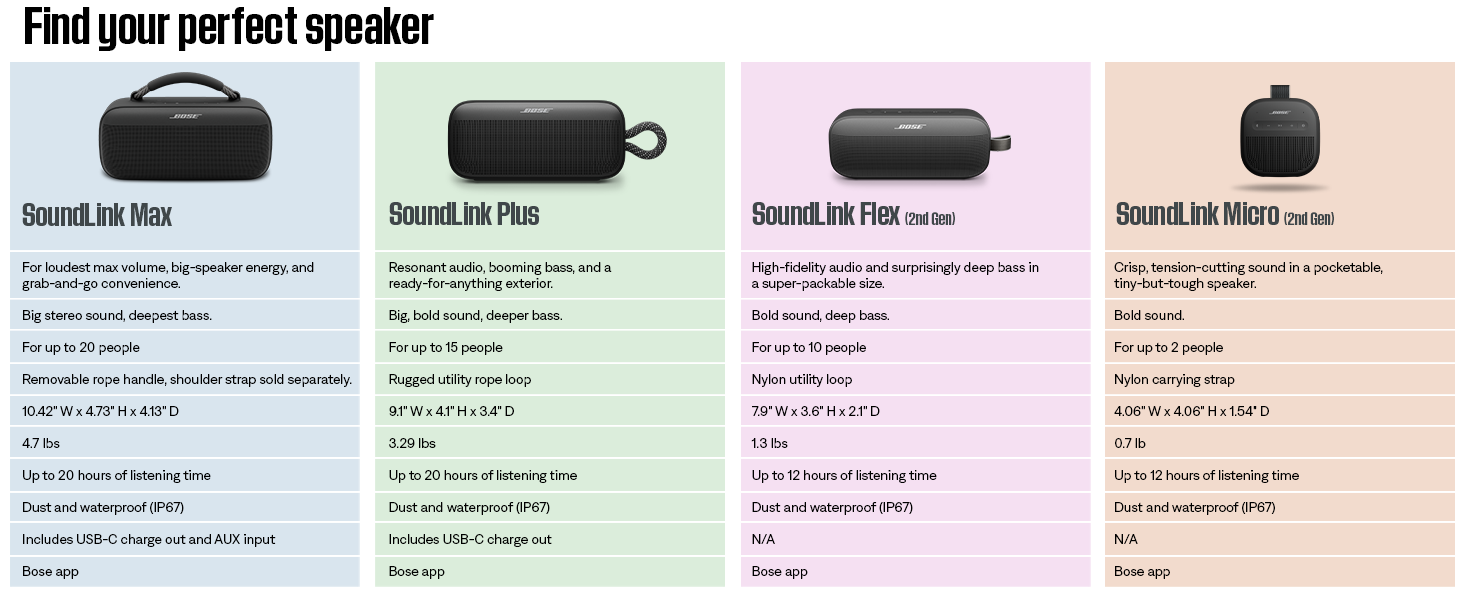
DEEP BASS, BIG SOUND: Whether you're the crew's go-to DJ or a music lover with the best playlists, the Bose SoundLink Max Bluetooth Speaker delivers deep, rich bass for a sound that will truly wow the party
VIBE WHEREVER YOU GO: Easily bring your Bose portable speaker to any hangout, the soft removable climbing rope handle makes it easy to pick up the party speaker so the music travels wherever you go
WATERPROOF AND DUSTPROOF: Worry less about accidental drops or getting caught in the rain, this dustproof and waterproof speaker is IP67 rated and is also shock and rust resistant
20 HOURS OF BATTERY LIFE*: This large portable speaker gives you up to 20 hours of battery life*, so you can listen to your favorite tunes all day and night so the party never stops. USB-C cable included
POWER UP WHILE LISTENING: The USB-C port on the back lets you charge any device using the speaker’s built-in battery which means if the SoundLink Max Bluetooth Speaker has power, so does your device
BUILT-IN AUX: The Bose SoundLink Max Portable Speaker features a built in 3.5mm AUX input so you can easily play tunes from your turntable, CD, or MP3 player with a wired connection
PERSONALIZE HOW YOU LISTEN: Using the Bose app, easily control EQ settings like bass, mid-range, and treble levels to perfectly customize the sound or use the app to check battery life and manage connected devices

This is a modal window.


Whether you’re the go-to DJ in your crew or a music lover with the sickest playlists, turn up the vibe with the Bose SoundLink Max Bluetooth portable speaker and take the party to the max.
How do I connect SoundLink Max speaker to my device?
How to connect SoundLink Max using your device’s Bluetooth settings?
How to connect an additional device?
How do I clear the pairing list on my SoundLink Max?
How do I connect SoundLink Max speaker to my device?
You can connect the speaker to your device using any of the following: Your device’s Bluetooth settings, The Bose app or Fast Pair (Android devices only).
When powered on, the speaker connects with the two most recently-connected devices.
How to connect SoundLink Max using your device’s Bluetooth settings?
Press and hold the Bluetooth button until you hear “Ready to connect” and the Bluetooth light blinks blue. On your device, access Bluetooth settings and select the speaker from the list of products. Once connected Bluetooth light glows solid white.
How to connect an additional device?
The speaker can be actively connected to two devices at a time. You can only play audio from one device at a time. Press and hold the Bluetooth button until you hear “Ready to connect”. On your device, open Bluetooth settings and select the speaker.
How do I clear the pairing list on my SoundLink Max?
SoundLink Max can have up to 8 devices paired in its memory. To clear the paired devices list, turn on the speaker and press and hold the Bluetooth button for 15 seconds.
You can also remove paired devices in the Bose app from the product settings.
To maintain the beauty and integrity of your purchase, we recommend treating it with care. Simple maintenance practices, such as gentle washing and proper storage, can effectively preserve the longevity of your favorites. We encourage you to refer to the care instructions included with each item, designed to help you keep your purchase in top condition.
Our dedication to excellence extends beyond materials; it encompasses the artistry and craftsmanship illustrated in every piece we create.