


Subscribe to our emails
Be the first to know about new collections and special offers.


Brand: Bose
Color: Black
Ear Placement: In Ear
Form Factor: In Ear
Impedance: 16 Ohms
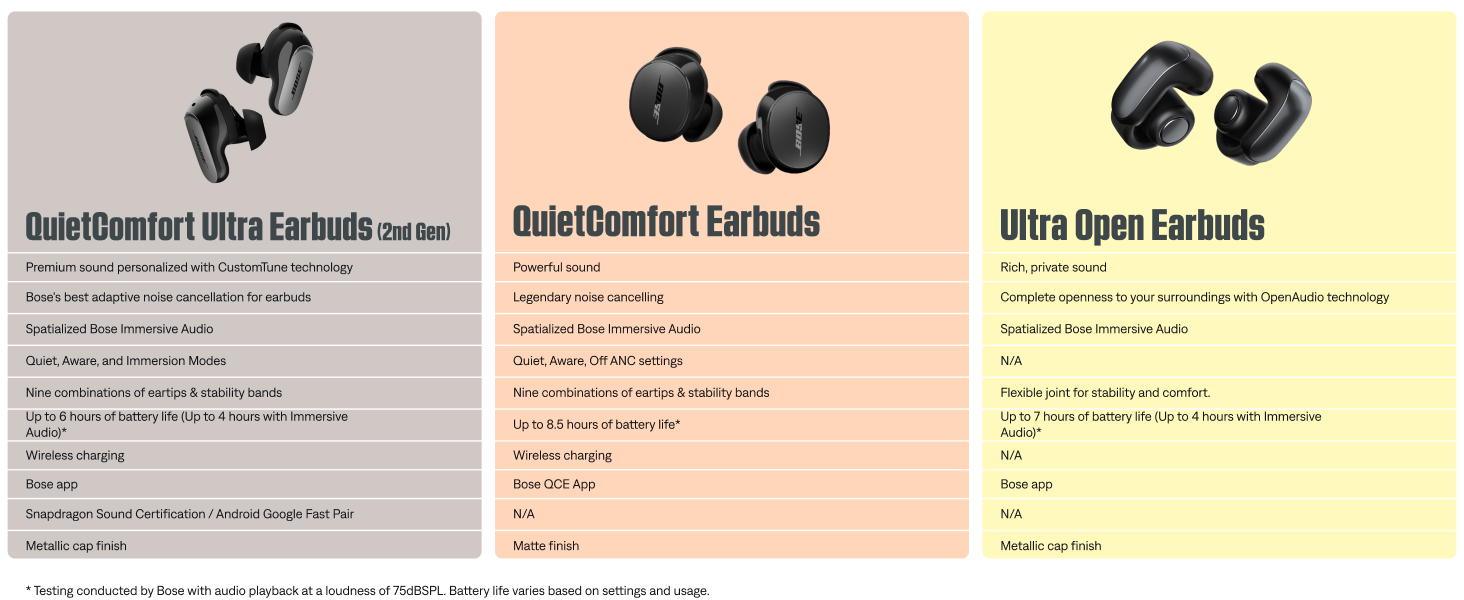
SOUND WITHOUT COMPROMISE: Seize the day your way and defy distractions using these wireless earbuds with world-renowned noise cancellation for a listening experience that makes the everyday sound epic
POWERFUL, PROVEN AUDIO: Get into it while you get after it, these IPX4-rated wireless earphones feature remarkable sound quality for a satisfyingly rich listening experience that hits all the right notes and perfect for workouts or running
SEIZE-THE-DAY STAYING POWER: These noise cancelling earbuds have wireless charging and let you listen for up to 8.5 hours* and a quick 20-minute charge in the wireless case extends the playback by up to 2 hours***. USB-C cable also included
A FIT THAT WON’T QUIT: To help you achieve the perfect fit, a trio of eartip and stability band sizes are included to ensure your in ear headphones feel comfortable, snug, and secure for a personalized fit
HANDS-FREE, HASSLE-FREE SWITCHING: Bluetooth multipoint lets you seamlessly connect the Bluetooth earbuds to multiple devices at once while Bluetooth 5.3 technology keeps you connected within up to 30 feet of your device
CONTROL AT YOUR FINGERTIPS: These Bluetooth earphones feature customizable tap control buttons that give you the power to skip songs, up the volume, and pause and play as you please
FULL CONTROL WITH THE BOSE QCE APP: Seamlessly control EQ settings like bass, mid-range, and treble levels to perfectly customize the sound, or use the app to check battery life and manage connected devices


This is a modal window.


How do I setup to my Bose QuietComfort Earbuds?
How do I connect my Bose QuietComfort Earbuds to my Bluetooth device?
How can I update my Bose QuietComfort Earbuds?
How do I reset my Bose QuietComfort Earbuds?
Can I restore my Bose QuietComfort Earbuds to factory settings?
How do I setup to my Bose QuietComfort Earbuds?
For the best experience, download and install the Bose QCE app from your mobile device's app store and follow the instructions.
How do I connect my Bose QuietComfort Earbuds to my Bluetooth device?
You can do this through the Bose QCE app. Alternatively, touch and hold either earbud for 4 seconds until you hear "Ready to pair" > Go to Bluetooth settings on your device > Select the earbuds.
How can I update my Bose QuietComfort Earbuds?
When an update is available, a message displays in the Bose QCE app on the product control screen. To begin the update, tap the message and follow the app instructions.
How do I reset my Bose QuietComfort Earbuds?
Touch and hold each earbud for 15 seconds until you hear a tone. The earbuds will power off. Then hold each earbud for 1 second to power them on.
Please note: Each earbud must be powered on/off individually.
Can I restore my Bose QuietComfort Earbuds to factory settings?
Yes. Delete the earbuds from your device's Bluetooth list. Then touch and hold the right earbud for 7 seconds until you hear "Ready to pair" followed by a tone. Release when you hear the tone. The earbuds are now in their original out-of-box state.
To maintain the beauty and integrity of your purchase, we recommend treating it with care. Simple maintenance practices, such as gentle washing and proper storage, can effectively preserve the longevity of your favorites. We encourage you to refer to the care instructions included with each item, designed to help you keep your purchase in top condition.
Our dedication to excellence extends beyond materials; it encompasses the artistry and craftsmanship illustrated in every piece we create.